
Recently, loads of computers start to experience Adobe Acrobat crashes – PDFs won’t load, Acrobat won’t even stay open – the app just closes down after a few seconds without any warning or error messages on screen.
The reason is the Adobe being Adobe – they just want to bloat.
The latest “force feeding” from Adobe is their insistance on installing their Adobe Express Photos app onto your computer – and you can’t opt out of it – and if the installation fails for whatever reason, Adobe Acrobat will commit suicide.
Now, on a regular computer, the whole process of their force app installation process of this 220MB app is pretty straight forward – if your Microsoft App Store works fine. If not, endless crashing loop happens. You will then have to download the offending app manually and install it manually. Download the app from here manually:
Adobe Express Photos (formerly Photoshop Express) – Free download and install on Windows | Microsoft Store
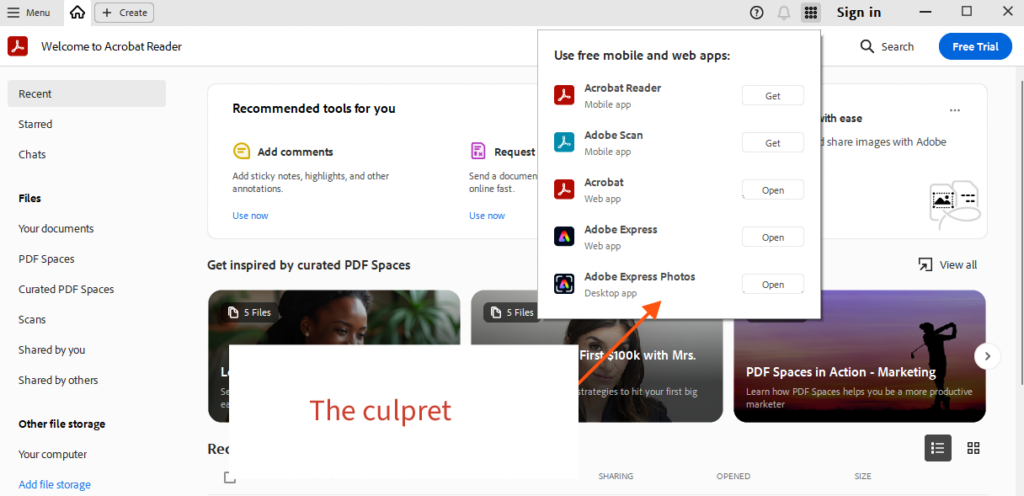
You can check the app’s status but clickingon the dialer icon top right of Adobe Acrobat if it stays open long enough (see picture above). If it says “open”, it is installed. if it says “install” you’d be lucky to be able to click on the install button at all before Adobe Acrobat crashes out as it tries to do the install itself – and fails (no, we don’t really trust Adobe to do anything right without payment).
Out of interest you might wonder what is this app anyway? Well, it tries to replace Microsofts own free app called Snippets, which makes screen captures – the picture above is made with Adobe’s Express Photo app. Is it worth it even if it’s free? NO – we normally use FastStone Image Viewer – much much more powerful and useful – and Free – free of hassle too which is worth quite a lot. Using Adobe Express Photos feels like playing with Kids building blocks.
Download FastStone Image Viewer here: FastStone Image Viewer, Screen Capture, Photo Resizer … We thoroughly recommend it.
Final note – Adobe will prompt you to allow their Express Photos to take over the screenshot facility in future – we don’t recommend it.